> For the complete documentation index, see [llms.txt](https://whitepaper.lastodyssey.io/lastodyssey/llms.txt). Markdown versions of documentation pages are available by appending `.md` to page URLs; this page is available as [Markdown](https://whitepaper.lastodyssey.io/lastodyssey/4.-commander-assemble/the-4th-sanctuary-war-obt-2.0-live/sanctuary-nfts-billboard.md).
# Sanctuary NFTs - Billboard
> Each of the 96 Sanctuaries in OBT 2.0 is paired with a unique **Sanctuary NFT (ERC-721)**. It grants the holder the ownership of a **billboard on the continent of Middangeard**– your logo, banner and social links are **always visible** on the live sandbox map, no matter which alliance currently occupies the sanctuary.
>
> While alliances fight for buffs and occupation rewards, Sanctuary NFT holders enjoy **persistent visibility** and **full control** over their Sanctuary’s display. In addition, Sanctuary NFT holders will unlock **exclusive holder rewards** prepared just for them – boosting the long-term value of the NFT.
>
> The **Sanctuary** NFT is an exclusive and highly valuable asset. It **cannot be bought or sold** and can only be acquired by forging a partnership with Last Odyssey or by becoming a Warlord.
***
## 🏰 What You Can Do With Sanctuary NFTs?
> #### 1. Permanent Billboard on the Map
>
> * Each Sanctuary NFT comes with a **visible billboard slot** on the live war map.
> * Partners can upload **logos, CTAs, project visuals, or social links**.
> * Always visible to thousands of active players moving across the battlefield.
>
> #### 2. Double In-Game Occupation Rewards
>
> * Sanctuary NFTs don’t just boost visibility — they also power up the war economy.
> * When a **Sanctuary is unlocked by its NFT holder** (this can be any partner or Warlord, not necessarily an alliance leader):
> * The **Sanctuary becomes NFT-activated**.
> * At the **end of the Sanctuary War**, the **alliance leader of the alliance that occupied this Sanctuary the longest** will receive **double token earnings**.
>
> #### 3. Exclusive Branding Presence
>
> * Every Sanctuary NFT is a **permanent placement for the entire OBT 2.0 season**.
> * Sponsors gain **guaranteed visibility** through:
> * Map billboards
> * Sidebar slots
> * Official announcements & event tie-ins
***
## ❓ How to Unlock and Edit Sanctuary Billboard?
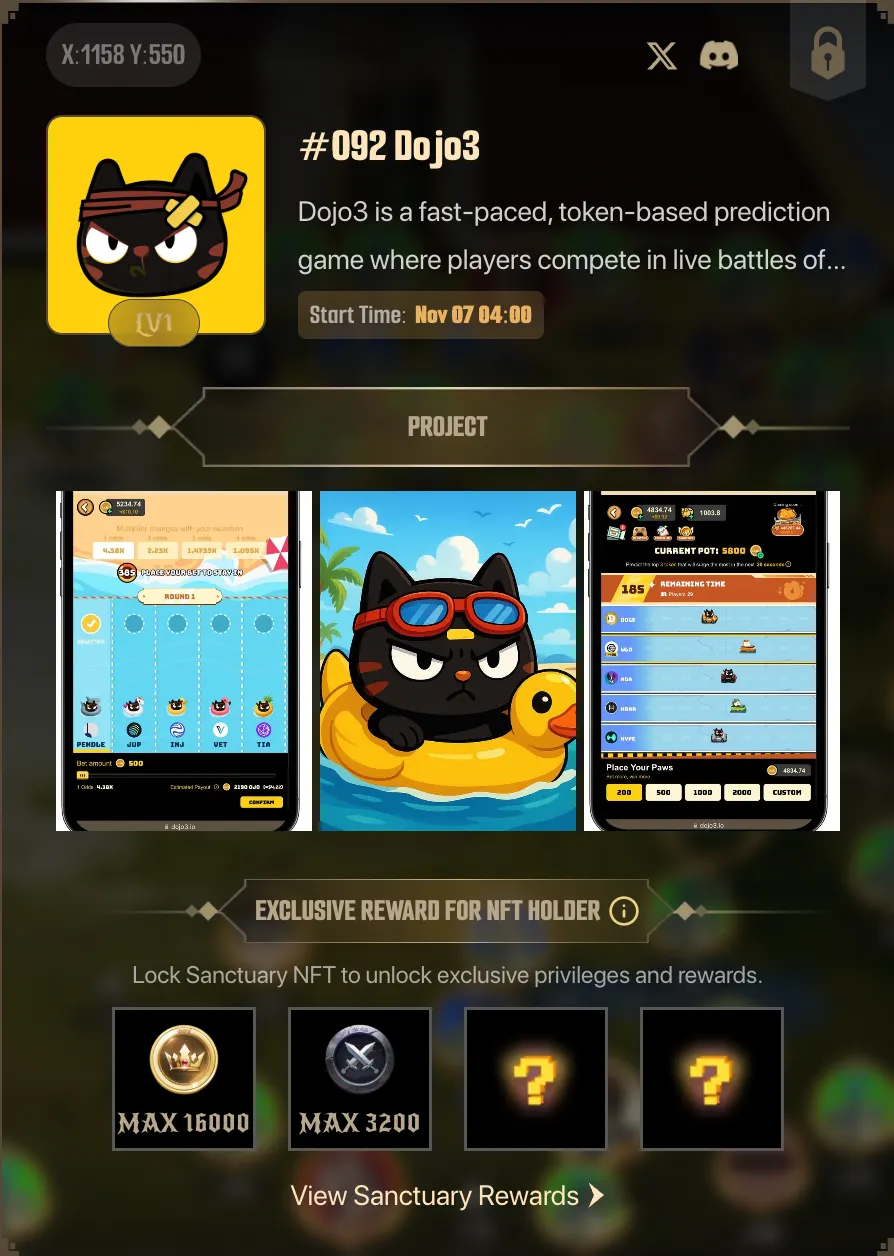
> Sanctuary NFTs aren’t just powerful assets — they also give you control of a billboard on the war map of Middangeard. These billboards are always visible to players, acting as prime real estate for branding, recruitment, and community messages.
> ### 🔑 Unlocking Your Billboard
>
> 1. **Own a Sanctuary NFT**
> * Each of the 96 Sanctuaries corresponds to a unique **ERC-721 NFT**.
> * Holding this NFT gives you billboard control for that Sanctuary.
> 2. **Connect Your Wallet**
> * Link your **Ronin Wallet** via the event dashboard.
> * Once verified, locate and lock your Sanctuary NFT to enable the billboard slot.
> 3. **Activation**
> * Once locked, your billboard becomes live during OBT 2.0.
> * If unedited, it will remain blank until you upload your design.
> ### 🎨 Editing Your Billboard
>
> 1. Upload Visuals
> * Add your **logo, banner, and project art**.
> * Your design appears directly on the live war map.
> 2. **Customize the Sidebar**
> * Add a project description, campaign info, or recruitment message.
> * Insert links to your **official** **website, X, Discord, YouTube, or other socials**.
> * When players click your Sanctuary/banner, they’ll see your message in the **sidebar panel**.
> 3. **Save & Publish**
> * Once published, your edits are live immediately.
> * You can update content anytime during OBT 2.0.
> ### ✅Sanctuary Visual Asset Specs
>
> To prepare your billboard, please provide the following assets:
>
> * **Project Description** → Max **500 characters**
> * **Project Icon** → Standard Twitter/X profile picture size works
> * **Project Pictures** → Up to **3 images**, **3:4 ratio**, **≤ 2 MB each**
> * **Project Banner** → Max **1 image**, **200 × 80 px**, **≤ 2 MB**
***